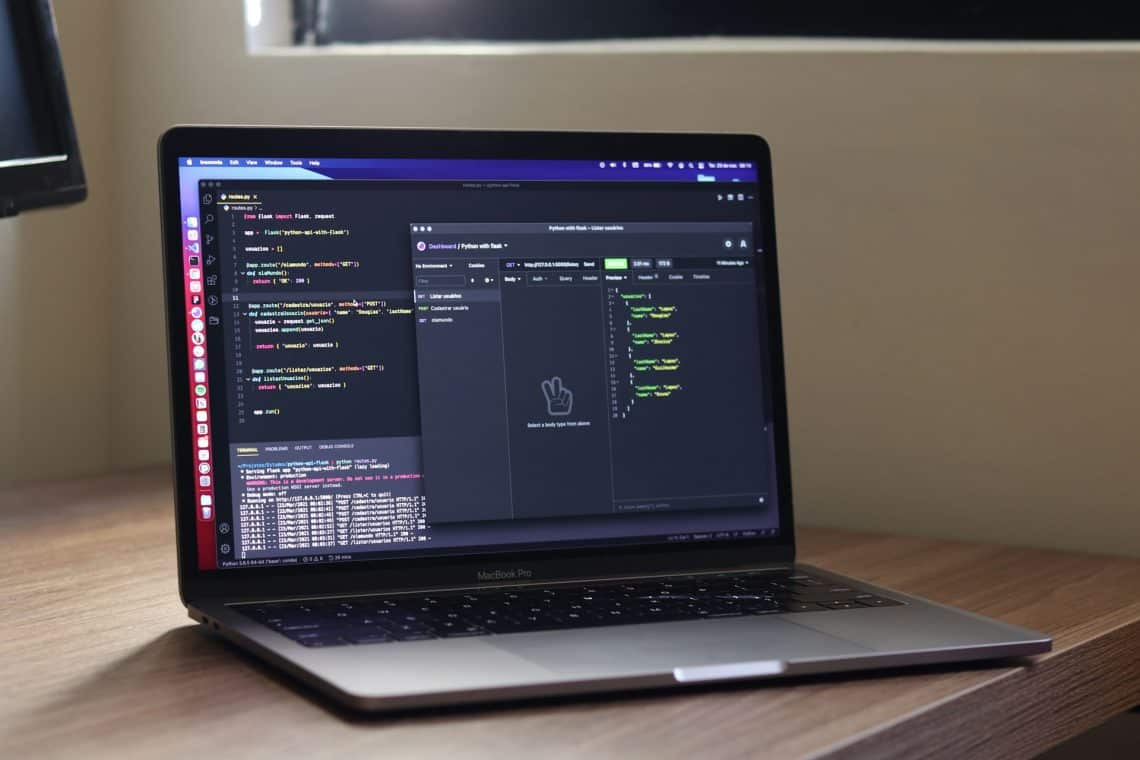
Your users judge your web app by what they can see. The part that decides whether it survives a Monday-morning traffic spike sits behind the screen, on the server. That layer handles your data, your business logic, and every connection to outside software, and it is usually the first thing to buckle when an app grows faster than expected.
This guide breaks down what you actually pay for when you hire a back-end team, framed around the three things that decide whether your app scales: APIs, databases, and a scaling strategy. If you want a fuller view of where these pieces fit together, this overview of back-end development services covers the scope in one place. By the end you will know which questions to ask a vendor and roughly what the work costs in 2026.
What Do Back-End Development Services Actually Cover?
The back end is the server-side half of your web app: the data, the logic, and the connections that make features work. It rarely gets credit when things run well. It gets all the blame when they don’t.
What the server side handles
Back-end development covers everything that runs on the server, including the database, the application logic, and the application programming interfaces (APIs) that let your app talk to other software. When you log in, pull up your order history, or get a push notification, the back end did the work and the front end simply showed you the result.
Why the back end breaks before the front end does
A prototype that works for ten people can fall over at ten thousand, and the failure almost always sits on the server. The API economy reached roughly $8.77 billion in 2026 (Fortune Business Insights), a sign of how much of an app’s value now lives in server-side connections rather than the screen. Get this layer wrong and you pay for it later in rewrites, outages, and slow pages. Get it right and growth costs you servers, not a rebuild.
How Do APIs Connect Your App to Everything Else?
APIs are the contracts that let your app talk to other software: your payment provider, your maps, your own internal services. Pick the wrong API style or wire an integration badly, and you feel it as slow pages or a surprise bill rather than as a clean crash.
The diagram below shows how a single web app reaches several outside services through one gateway.
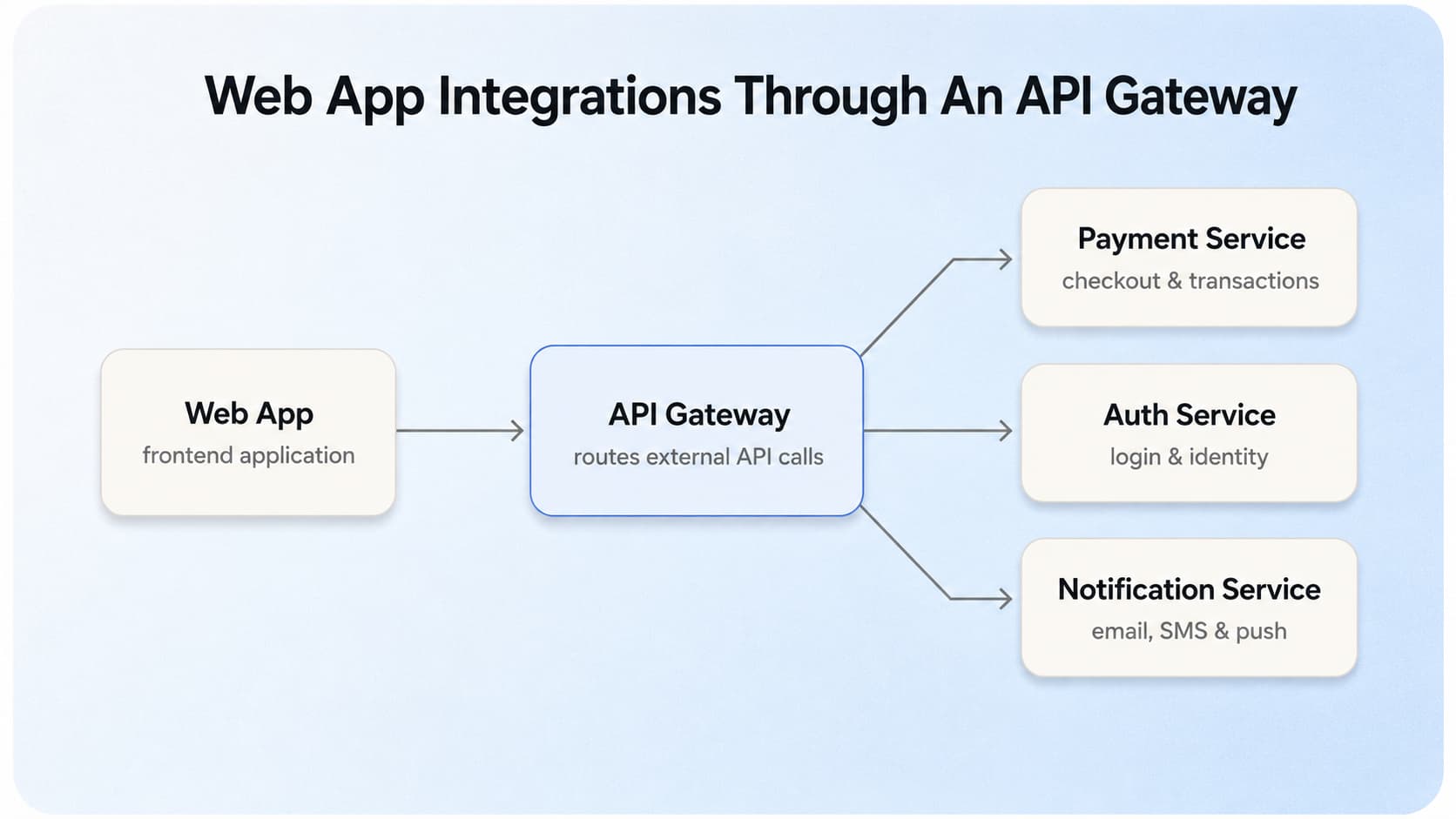
Web app connecting to payment, auth, and notification services through an API gateway
REST vs GraphQL: which fits your data
Use Representational State Transfer (REST) for simple, cacheable endpoints where each resource maps to a clear address. Reach for GraphQL when your screens need varied, nested data and you want to pull it in one request instead of five. The wrong choice rarely takes the app down. It shows up as over-fetching, extra round trips, and mobile screens that load slower than they should.
What third-party integrations actually cost
Every integration is its own small build, not a checkbox. Expect roughly $2,000 to $30,000 per integration (Aalpha, 2026), and the spread comes down to how complex the partner’s authentication is and how stable their API stays over time. A well-documented payment API sits at the low end. A legacy enterprise system with quarterly breaking changes sits at the high end.
Why API security is part of the build, not an add-on
Treat security as part of the API build from day one. The controls that matter most are practical:
- Token-based authentication so every request proves who it is
- Rate limiting to stop one client from overwhelming the service
- Input validation to reject malformed or malicious data at the door
- Encrypted transport so data in flight can’t be read
Skip these and the most common result is a breached or abused endpoint, which costs far more to clean up than to prevent.
Which Database Setup Fits Your Web App?
Your database choice follows the shape of your data, not the latest trend. Get it right and queries stay fast as records pile up. Get it wrong and you are migrating data under pressure while users wait.
SQL vs NoSQL by the shape of your data
Relational (SQL) databases like PostgreSQL and MySQL fit structured, related records where accuracy matters: orders, payments, and anything you report on. Document (NoSQL) databases like MongoDB fit flexible or fast-changing data, such as activity feeds or catalogs with uneven fields.
The table below compares the two families across the four dimensions that matter most as your app grows.
| Relational (SQL) | Document (NoSQL) | |
|---|---|---|
| Data shape | Structured, related | Flexible, nested |
| Best for | Payments, orders, reporting | Feeds, catalogs, fast-changing schemas |
| Scaling style | Vertical first, then read replicas | Horizontal by default |
| Main trade-off | Schema changes are rigid | Weaker multi-record transactions |
How indexing and queries decide real-world speed
The same database can feel instant or painfully slow depending on how it is indexed. Without an index, a lookup scans every row, so a query that flew at 1,000 records crawls at 1,000,000. Good back-end work means indexing the columns you actually search and reviewing slow queries before they reach users.
What Does It Take to Scale a Back End?
Scaling is designed in early, not bolted on after your first traffic spike. The aim is an app that absorbs growth by adding resources, rather than one that needs a rebuild every time usage doubles.
The diagram below shows how traffic spreads across servers, a cache, and database shards as load grows.
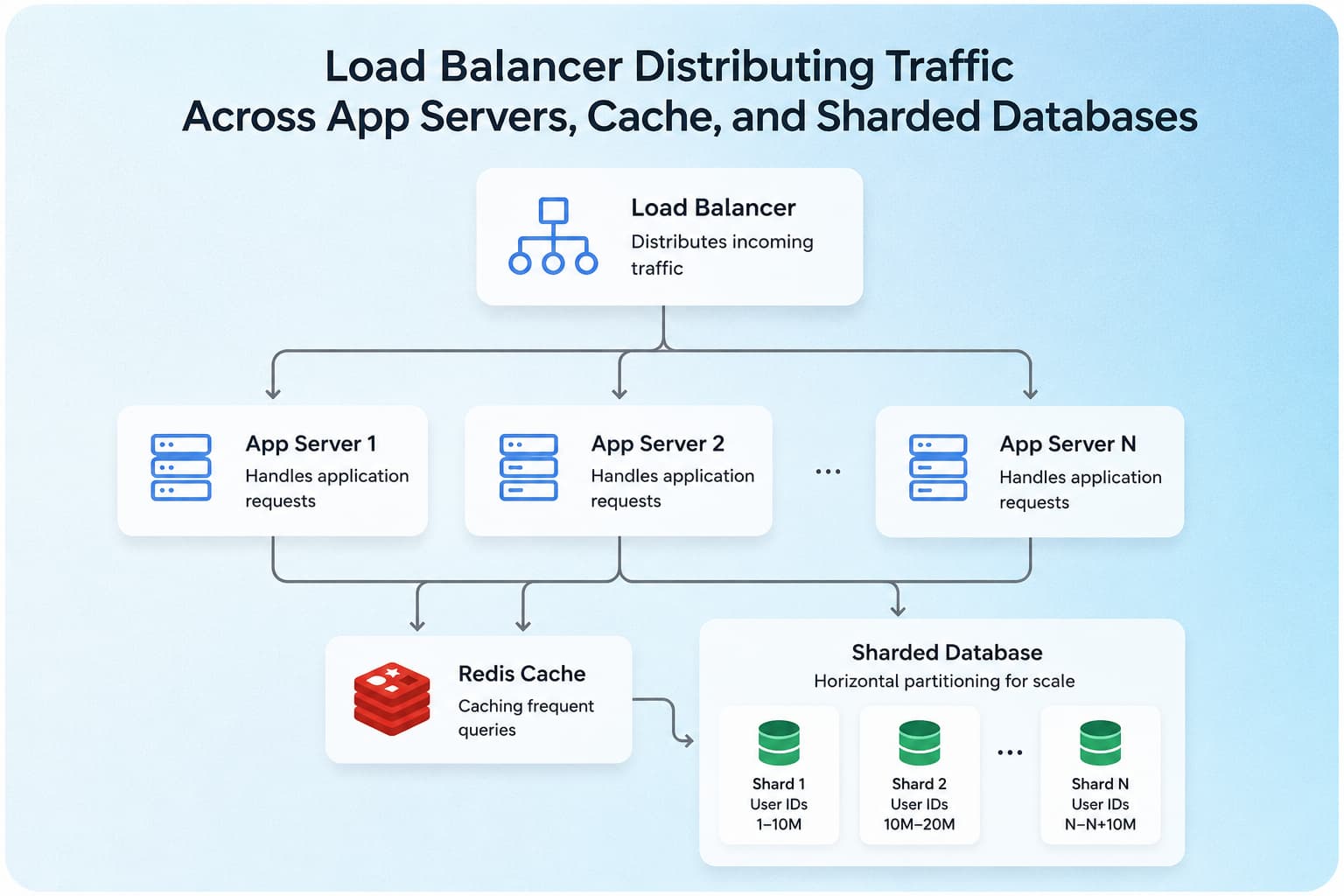
Load balancer distributing traffic across app servers, a cache layer, and sharded databases
Horizontal scaling and load balancing
Horizontal scaling means adding more servers and spreading traffic across them with a load balancer, rather than buying one ever-bigger machine. It is what lets an app soak up a sudden spike without falling over, and it stays far cheaper at scale than repeated vertical upgrades.
Caching layers
A cache such as Redis stores frequent results in memory so your database is not hit on every request. For read-heavy apps this is the single biggest win for response time, often cutting database load by a wide margin and keeping pages fast during peaks.
Database sharding
Sharding splits one large database across several machines by a key, such as account ID or region. It is a later-stage move most apps never need, so reach for it only when a single database genuinely cannot hold the write volume. Adding it too early buys complexity you then have to maintain for no real gain.
How Much Do Back-End Development Services Cost?
Most custom back-end builds land between $15,000 and $75,000 (Aalpha, 2026), but that range hides a lot. What you pay depends on scope, the number of integrations, and where your team sits.
Cost by project scope
Cost tracks scope more than anything else. Rough 2026 ranges look like this:
- Simple CRUD back end: from about $5,000
- API-centric build: $10,000 to $40,000
- Enterprise-scale platform: $200,000 and up
(Aalpha and Space-O, 2026.) The jump between tiers comes straight from the API and database complexity covered above. More integrations and a sharding-ready data layer push you toward the top.
What drives the rate: region and seniority
After scope, your hourly rate is set mostly by where your team works and how senior they are. The table below shows typical 2026 back-end rates by region.
| Region | Typical hourly rate (2026) |
|---|---|
| United States | $100–200 |
| Eastern Europe | $40–80 |
| Latin America | $35–80 |
| India | $25–60 |
Methodology: Hourly ranges compiled from Fiverr and Index.dev 2026 freelance and agency rate guides; figures are typical bands, not guaranteed quotes.
Region sets the band. Within any band, seniority matters more for architecture calls than location does, so a senior engineer at $80 an hour who designs the right database from the start is usually cheaper than a junior at $40 who does not.
Conclusion
APIs, databases, and a scaling plan decide whether your web app holds up as it grows, long after the visible design is finished. When you weigh a back-end partner, judge them on those three, not on the lowest quote. The cheapest build is rarely the one that survives your second year.
FAQ
What is the difference between front-end and back-end development?
The front end is what users see and click; the back end is the server-side engine that stores data, runs logic, and powers those clicks. A front-end developer makes a button look right, while a back-end developer makes it actually charge a card or save the record.
How long does it take to build a back end for a web app?
For a mid-complexity web app, expect 2 to 4 months, assuming a team of one back-end engineer, a part-time DevOps engineer, and a QA. A simple CRUD back end can be ready in 4 to 6 weeks, while an enterprise platform with many integrations runs 6 months or more.
Do I need microservices or is a monolith enough to start?
Start with a monolith. Microservices pay off once you pass roughly 10 engineers or have clearly separate domains that deploy on different schedules; before that, they add overhead you do not need.
Can I scale my back end later, or does it have to be designed for scale from day one?
It depends on how fast you expect to grow, but a few cheap decisions early keep the door open:
- A database schema that can add read replicas without a rewrite
- Stateless services that sit behind a load balancer
- A caching layer you can switch on when reads climb
You can add raw capacity later. Retrofitting a stateful, single-server design is the expensive path.
How much does back-end development cost for a small business?
For a small business, a focused back end usually costs $5,000 to $25,000 in 2026, depending on how many third-party services it connects to. Keeping the first version to two or three core integrations is the simplest way to stay near the bottom of that range.